

Getting started

Get started with ApostropheCMS using the CLI. Choose between Astro or Standalone Apostrophe, set up your project in minutes, and learn what to expect from each path.

    • Beginner
    • 3 min read
    • Evaluation and Onboarding
    • Last Updated August 5, 2026

A CMS that fits your stack, set up in minutes

One command. A few prompts. A working ApostropheCMS project with editable pages, visual editing, and a content structure you can build on. Used in production by engineering teams at Michelin, iCIMS, and others.

AstroJS Icon

AstroJS + ApostropheCMS

Use your preferred frontend framework: React, Vue, Svelte, Solid, and more. Best if your team has a framework they already know, or you're building a site that needs full frontend flexibility.

Performant static builds

Astro's static rendering and partial hydration model means pages can be served as pre-built HTML with JavaScript only where it's needed.

De-coupled CMS and frontend

The Astro path gives frontend developers their own project with familiar component tooling. The CMS handles content, the frontend handles rendering.

Production from the start

The Astro architecture reflects where the ecosystem is headed and has strong backing — including from Cloudflare. It's the recommended path for new production projects.

Apostrophe CMS icon

Standalone ApostropheCMS

JSX and Nunjucks templating built in, no separate frontend layer. Best for simpler projects or teams who want a single unified environment.

One codebase, one deployment

Standalone Apostrophe is a single Node.js application. No coordination between services, no shared keys to manage, no deployment order to worry about.

Preference for JSX or Nunjucks templates

JSX and Nunjucks are solid, well-understood templating approaches. If your team is comfortable in either, you don't need to introduce a separate frontend framework and application layer to build a great site.

The project is straightforward

A marketing site, a content hub, an internal tool — projects where the editorial team needs a great page-building experience and the development team wants to move quickly without additional infrastructure. Standalone is the lower-complexity choice, and lower complexity is a feature.

Setting up with the CLI

Both architectures start the same way. Run the command, answer the prompts, and the CLI configures everything — including the integration between your frontend and backend if you choose Astro.

bash
npm create apostrophe@latest

The choices you'll make during the CLI flow

  1. Project name — becomes your folder name and shortname

  2. Architecture — choose ApostropheCMS + Astro or Standalone Apostrophe here. This is the only step where the two paths diverge.

  3. Project type — Barebones (a clean slate) or Demo (a working blog with widgets and sample content to explore)

  4. Package manager — choose your preferred package manager

  5. Database — SQLite (recommended), PostgreSQL, or MongoDB

  6. Admin account — set a secure password for the admin user

  7. Telemetry — opt-in anonymous usage signals (install success, database choice). No personal data, no content. Review exactly what's collected and opt out at any time.

What to expect at the end of the CLI flow

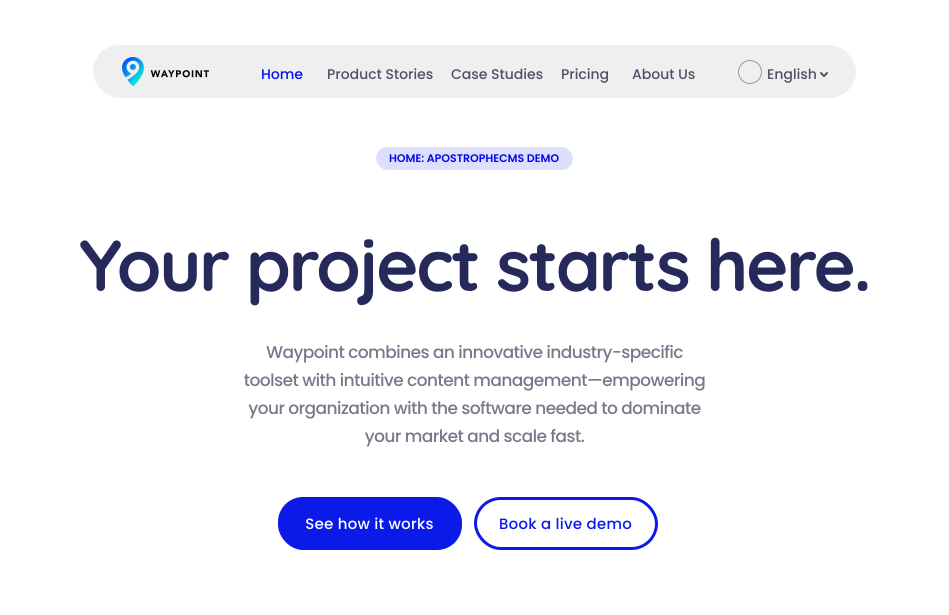
Within a couple of minutes, you'll have a project running locally that can serve as a proof of concept and kick off your work with ApostropheCMS.

apostrophecms demo welcome screen

After running the command and choosing ApostropheCMS + Astro, you'll have:

  • Your Astro frontend running at http://localhost:4321 with login and visual editing

  • An ApostropheCMS backend API running at http://localhost:3000

  • Your content managed in ApostropheCMS, rendered by Astro — connected out of the box

  • A codebase that's yours to build on. No black boxes.

Is standalone ApostropheCMS right for me?After running the command and choosing Standalone ApostropheCMS, you'll have:

  • Your site, admin panel, and visual editing all running at http://localhost:3000 — one environment

  • Pages server-rendered with JSX or Nunjucks templates

  • A codebase that's yours to build on. No black boxes.

Frequently asked questions

Yes. ApostropheCMS has a first-party Astro integration that connects Apostrophe's content management and visual editing experience to an Astro frontend. Astro handles your pages and lets you build with the frontend framework your team already knows: React, Vue, Svelte, Solid, and more. ApostropheCMS handles your content model, media, and in-context editing. It's the recommended architecture for new projects.

The difference is your frontend. With ApostropheCMS + Astro, Astro renders your pages and ApostropheCMS manages your content — you get static-site performance, your choice of frontend framework, and a full visual editing experience. Standalone Apostrophe uses Node.js with JSX or Nunjucks templates for both frontend and backend in a single environment — simpler setup, full control, no separate build process. Both give you the complete ApostropheCMS editing experience.

SQLite is the recommended starting point, because it requires no setup and is configured automatically by the CLI. For production deployments, MongoDB with Atlas is a well-tested path with a free tier to get started and PostgreSQL is also fully supported.

Yes, but not automatically. ApostropheCMS supports all three databases, but there's no built-in migration tool, so switching requires manually migrating your data. If you're planning a production deployment, it's worth choosing your target database before you start building. When in doubt, start with SQLite to evaluate, then plan your migration before you go live.