


An editorial workflow that works from the start

Create, review, approve, and publish content with confidence while keeping control over who can make changes and when they go live.

Keep content moving from draft to publish

ApostropheCMS gives teams a structured process for moving content forward without affecting what is already live. Editors work safely in draft, preview and share changes, submit them for review, and publish immediately or at a scheduled time.

This editorial workflow is included in the Community Edition. Teams with more advanced needs can extend the workflow with the Pro modules that come in Pro and Assembly tiers.

Version history protects published content at every stage.
  • Preview and share

Give stakeholders a preview without giving them CMS access

In Apostrophe, "Share Draft" generates a private preview link for any draft document. Anyone with the link can see the content exactly as it will appear when published without logging into ApostropheCMS. Send the link to legal for a compliance check, a client for sign-off, or a stakeholder who only needs to review the work.

    • Included in our Community Edition.
  • Review and approval

Move content forward with the right oversight

In the core CMS workflow, contributors can create and edit drafts but cannot publish changes directly. Instead, they submit their work to editors or admins for review. Editors and admins can see how many submissions are pending, open and review the proposed content, make additional changes, and choose whether to keep it in draft or publish it. The Recently Edited Documents manager provides an audit log of changes across the workflow.

Recently edited documents manager
  • Publish

Publish when content is ready or for future publication

Approved content can be published immediately or scheduled to go live at a specific date and time. Scheduled publishing helps teams prepare campaigns, announcements, and time-sensitive updates in advance. ApostropheCMS handles the publication at the selected time, so teams do not need someone standing by to make the change manually.

Date and time stamp fields showing scheduled publishing

Upgrade to Apostrophe Pro when you need more control

  • Version control

Review changes and restore an earlier version

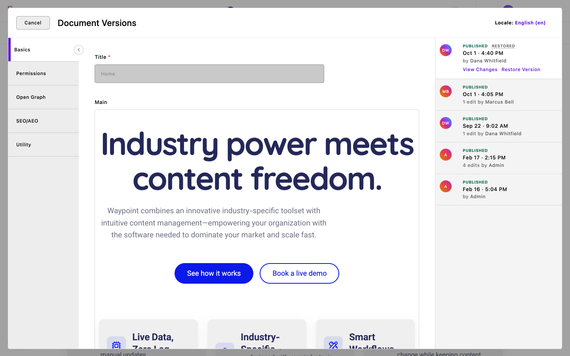
With Document Versions, ApostropheCMS captures the history of published changes, including who changed the document, when the change occurred, and what changed. Editors can compare any two versions side by side and restore a previous state with a single action. This gives content managers a useful audit trail while ensuring that an earlier version is available when something needs to be reversed.

  • Advanced roles & permissions

Extend your project for next-level permissions

For teams that need more granular control, Advanced Permission lets admins define which groups can create, edit, submit, approve, and publish content on a per-type and per-document basis.

Developers can also add custom permissions connected to their own business logic, which admins can then assign to specific users and groups.

One workflow, built for the whole team

Content managers

Keep content moving without losing oversight. Create a clear path from contribution to publication. Control who can publish, bring external stakeholders into the review process, and maintain a reliable record of published changes when your team needs it.

Defined contributor, editor, and admin roles

Pending submissions in one place

Private draft links for external review

Scheduled publishing

Granular permissions with Advanced Permissions Pro

Version comparison and restoration with Document Versions Pro

Editors and contributors

Know what is ready, what is live, and what happens next. Work safely in draft without changing the published site. Preview content as it will appear, submit it for review, and publish immediately or schedule it for later when you have the appropriate access.

Separate draft, preview, and live states

In-context preview

A clear submission and review process

Share Draft links

Immediate or scheduled publishing

Protection against accidental changes to live content

Developers

Start with a working workflow—and extend it when needed. Draft states, submissions, publishing roles, Share Draft, and scheduling are already part of the open source core. Configure the experience around your content model, or use Advanced Permissions Pro to introduce more granular and custom controls.

Open source workflow foundation

Core contributor, editor, and admin roles

Permissions by content type and document with Pro

Custom permissions connected to business logic

Admin-managed user and group access

No need to build basic workflow infrastructure from scratch

Build a content process your team will actually follow

Give contributors a safe place to work and editors a clear path from review to publication with accurate previews, intentional approvals, scheduled publishing, and safeguards for teams that need them.

Common questions about editorial workflow

Yes. Draft states, content submission, core role-based permissions, and content state management are included in the open source, MIT-licensed core. Contributors can submit proposed changes, while editors and admins can review and publish them.

Yes. Share Draft generates a private preview link that anyone with the link can open in a browser. It shows the draft as it will appear when published without requiring a CMS account or changing the live page.

Yes. Scheduled publishing is included in Community Edition and all paid editions. Editors can select a date and time for content to be published automatically.

The open source core distinguishes between contributors, editors, and admins. With Advanced Permissions Pro, admins can control which groups can create, edit, submit, approve, and publish on a per-type and per-document basis.

For example, one group might be able to publish articles but only edit drafts of pages.

With the Document Versions Pro module, editors can view the history of published changes, compare two versions side by side, and restore a previous state.

Working on content and publishing content are separate actions. Draft changes do not affect the live site. Contributors must submit their changes for review, while editors and admins must take a deliberate action to publish them.

Advanced Permissions Pro provides more granular control over who can directly publish different content types or documents.