
Yes. The complete editing experience — in-context visual editing, rich text editor, layout builder, styles editor, and inline media editing — is part of the open source MIT-licensed core. There is no enterprise plan required to unlock the editing UI, and no feature-gated version of visual editing. What you see in the demo is what you get with the free, self-hosted open source installation.
A CMS built for better content experiences
Give your collaborators, editors, marketers, and managers an intuitive way to create and manage content while giving developers the flexibility to build custom digital experiences. True in-context visual editing reduces the learning curve and the time it takes to publish.

Where developers and editors are both at home
Most CMSes optimize for one audience at the expense of the other. ApostropheCMS is built to make both genuinely happy. Product teams and developers define the rules, editors own the content.
Open Source
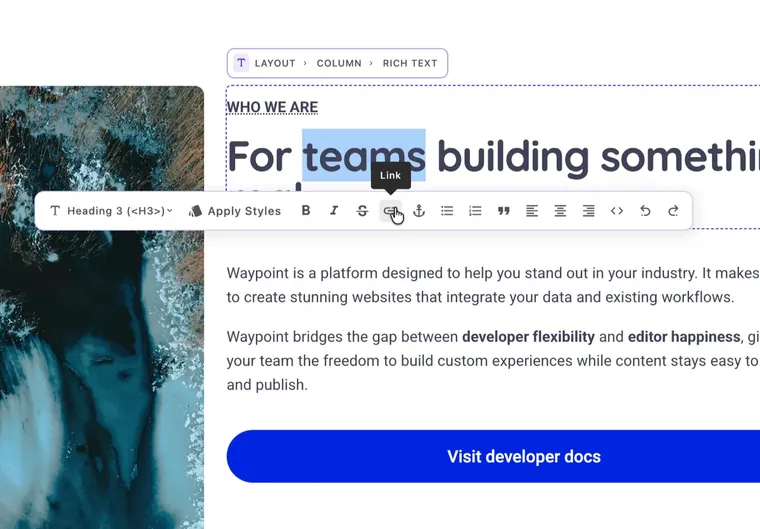
It starts with a modern WYSIWYG editor
ApostropheCMS includes a full-featured and extensible rich text editor with the formatting tools editors expect out of the box. Developers can customize available controls, styles, and behavior to match the needs of their project.

Open Source
Add supporting media with built-in and extendable tools
Apostrophe's open source core comes with a Media Library and pre-baked widgets for images and videos. Image optimization and image editing tools like responsive focal point, cropping, and aspect ratio are also supported. The video widget supports Vimeo, YouTube and your oEmbed providers of choice, and self-hosted background video is also possible.

Pro Feature
Lay it all out on the page without custom code
The built-in ApostropheCMS layout widget provides a simple drag-and-drop page layout experience. Developers define the grid and decide which widgets to allow in a column. Editors can mark columns to be hidden on mobile or tablet, or just let the grid system automatically stack them at appropriate device sizes.

Pro Feature
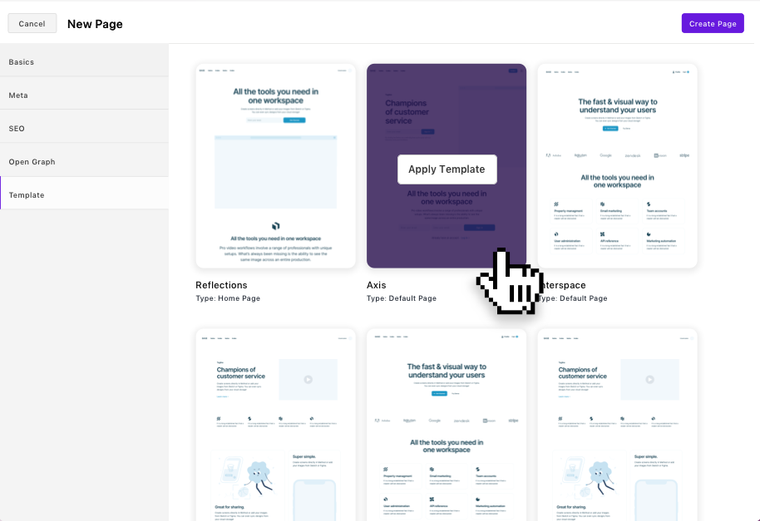
Create content fast within defined structures, or define and save your own templates
ApostropheCMS's core architecture was designed to make it easy for developers to create templates for structured content, but it doesn't stop there. Editors can create and save their own layouts as reusable document and section templates too — no dev ticket required.
Open Source
Maintain design consistency without sacrificing creativity
Apostrophe's Styles Editor strikes a balance when it comes to control: Developers configure the available style options on any given piece of content so that content creators can move quickly and freely while maintaining a strong brand.

Only on ApostropheCMS
Bring visual editing to Astro-powered experiences
Astro gives developers frontend freedom. ApostropheCMS adds the structured content and editing experience teams need to manage those sites.
Get Started
Like our CMS demo? Spin up your own and extend from there.
The beauty of ApostropheCMS is in its strong foundation and true flexibility. If you've already gotten a taste of the editing experience via our public demo, spin up one of your own to customize.
When editors can move fast independently,
developers stay focused.
Apostrophe's feature-rich core offering is exceptionally well-maintained, providing a stable foundation for iCIMS' needs. The platform's architecture made it simple to build upon and customize, accelerating development and deployment processes.

Matteo Hernandez
Senior Product Manager, iCIMS
Dig deeper into the CMS editing experience
For Developers
For Editors & Content Teams
See it for yourself
The best way to understand in-context editing is to use it. Try the demo and see what your content team's day-to-day could look like, or get a proof of concept project running in 5 minutes.
ApostropheCMS editing tools: common questions answered
In a traditional CMS, editors work in a backend interface that looks nothing like the published page. They type content into fields, save, and then check a preview to see how it looks — often discovering layout issues or formatting problems only after the fact. In ApostropheCMS, the editing interface lives directly on the live page. Editors click any element to edit it, see changes in real context as they work, and publish from the same view their audience will see. There is no preview step because there is no gap between the editing view and the published result.
No. Developers define which widgets are available, what fields they contain, and which styles can be applied. Editors assemble pages within those bounds — they have genuine autonomy over content and presentation without access to anything that could override the design system. The constraint is invisible to editors; they experience it as a well-organized set of tools, not a restriction.
Yes, and ApostropheCMS is the only CMS that makes this possible. Most headless CMSes can deliver content to an Astro frontend via API, but none can provide editors with a visual editing experience on top of it. ApostropheCMS adds its editing controls and content metadata to the Astro-rendered page, letting editors update area and widget content in context while the same Astro components render both the live site and editing previews—without a separate preview frontend or duplicate templates.
Developers configure the rich text editor's toolbar during setup — choosing exactly which formatting options are available to editors. If your design system doesn't use underlines, you remove the underline button. If you want editors to be able to add callout blocks but not change font sizes, you configure it that way. Editors work with a clean, purposeful set of tools rather than a full word processor, which reduces formatting inconsistencies at the source.