
In-context visual editing
Edit on the real page
Add and arrange widgets
Preview by breakpoint
Start with a complete open source Node.js CMS foundation, then focus on the schemas, frontend, and product-specific work that sets your product apart.
Stable CMS foundation
ApostropheCMS already handles the editorial UX, workflow, permissions, localization, media, and platform behavior you’d otherwise have to design, build, and maintain yourself. All open source unless marked otherwise.

Edit on the real page
Add and arrange widgets
Preview by breakpoint
Global and per-widget styles, limited to the controls you define
Layout widget allows editors to add, remove, and resize columns per section
A flow that covers drafts, preview, and publishing
Submission workflow for lightweight editorial governance
See who changed what and when
Support for draft versions
Restore versions
Roles out of the box for contributors, editors, admins
Share read-only previews via link
Advanced permission add-on (Pro)
Unlimited locales
AI-powered translation (Pro)
Built-in meta fields, robots.txt, and sitemaps, redirects
JSON-LD structured data
AI-powered SEO Assistant (Pro, Assembly)
Sign in with Google Workspace, Okta, Azure AD and other identity providers
Uses your existing accounts, so there are no separate CMS passwords to manage
Shared image and file library
Crops and focal points
Video and image widgets as part of the open source core
Modern tech stack
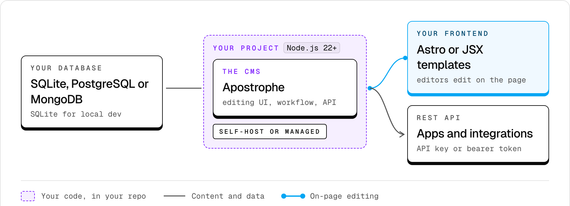
ApostropheCMS is written in JavaScript and requires Node.js 22+. Use SQLite for local development and small sites, or PostgreSQL 14+ or MongoDB 7.0+ in production. Self-host anywhere Node.js runs or choose Apostrophe-managed hosting.
Simple core concepts
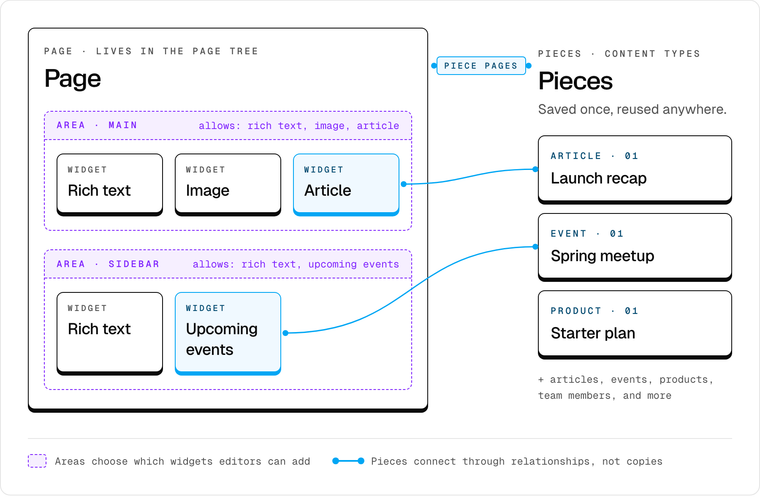
Once you have the core concepts down, planning an architecture and extending the CMS in a way that works for your whole team is easy. And, of course, working with your AI greatly reduces learning time.
Pages: Content with its own URL, like home, landing and about pages.
Pieces: Reusable structured content, like articles, people, events and products.
Widgets: The components editors add to a page, like testimonials, image blocks and feature cards.
Areas: The places on a page where you decide which widgets editors can use.
Flexible content model
AI makes it easier than ever to produce content and visuals, but the challenge is keeping the content and design consistent, useful, secure, and true to your standards.
More realistically, you take your team's detailed requirements to an agent, and let that agent write the schema using ApostropheCMS docs for context.
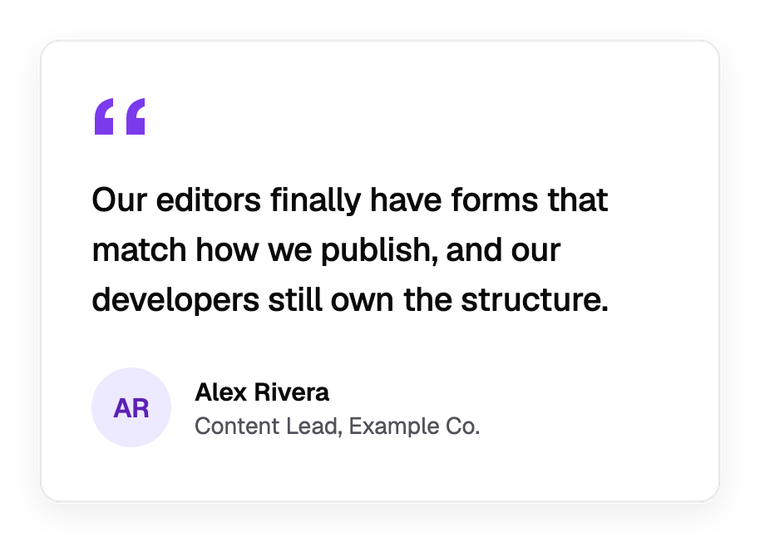
Apostrophe turns the schema into editing fields automatically—a textarea for the quote, text inputs for name and role, an image picker for the photo, and a select for style—with no extra UI code required. When in-line editing is a good fit for the specific content, the path to build a widget editable on the page is simple.

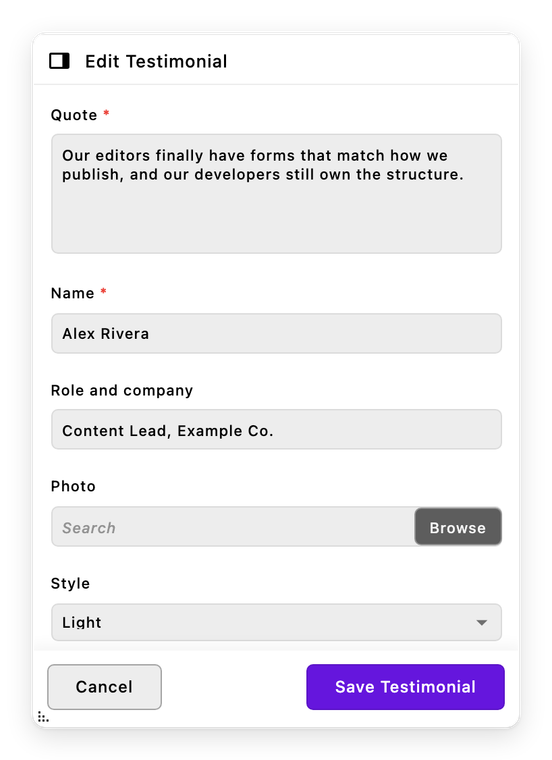
Define the model once. Editors get exactly the controls you allow, and your frontend gets predictable, structured content.

Developer freedom
With Astro, you choose the UI framework that fits the project, and editors still get the advantage of in-context visual editing (right on the page). Don't want or need a separate frontend? Apostrophe's native templates use JSX by default.
For native apps, integrations and other systems, your pages and pieces are available through the REST API. Requests need an API key by default. To make a page or piece type public, list the fields to share in its publicApiProjection option. Public access is read-only.
API key auth
Extend without forking
Add the fields, content types and features that are specific to your business in your own project modules. Apostrophe’s core stays a dependency you update, not code you maintain.
Connect the systems you already run, and turn them into widgets editors can place anywhere you allow. Each of the concepts below is a project module, which means it would be your code, your data source, and an editing experience Apostrophe builds from your schema.
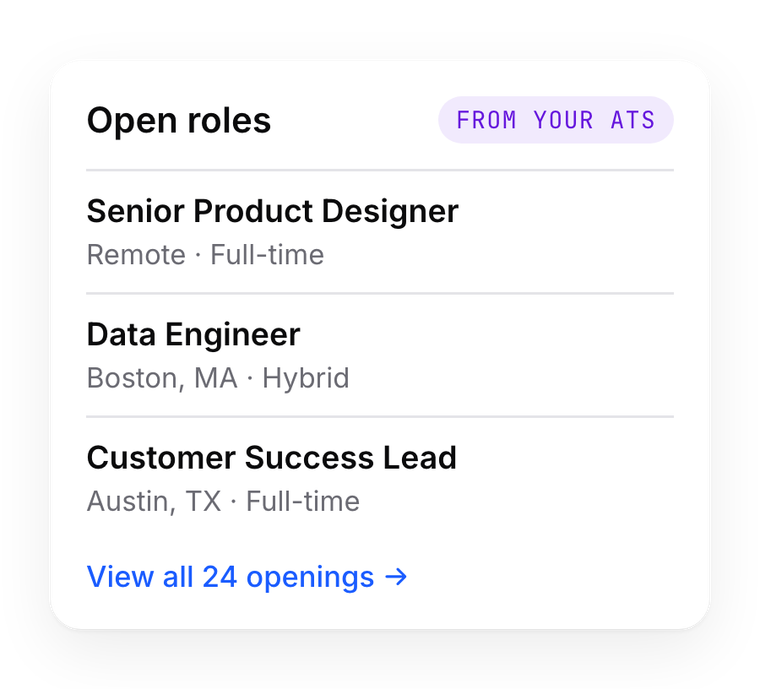
Openings from an applicant tracking system, placed by editors on any careers page.

Live flight data from a booking or schedule system, added to any destination page.
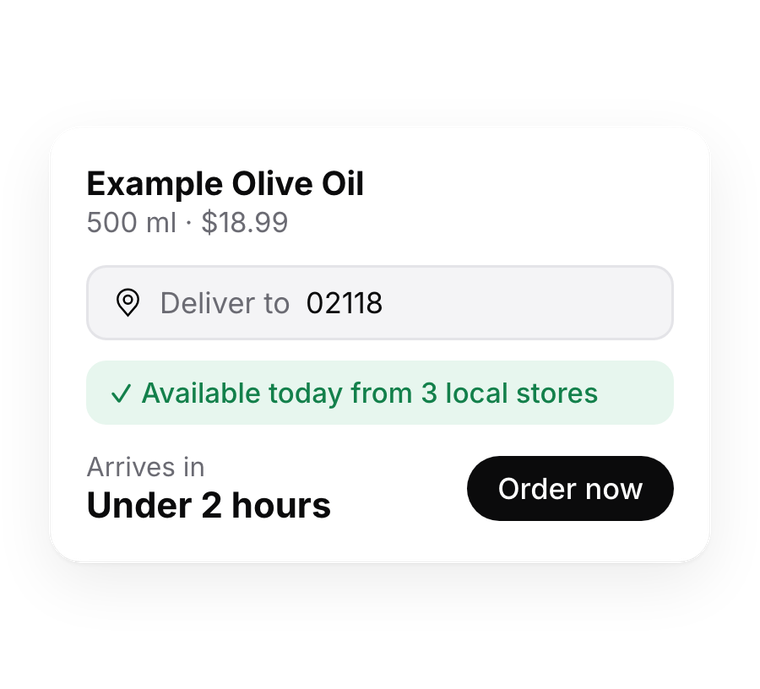
Shoppers enter an address to see what’s available nearby and order from local stores.
You extend core for project-level customizations, you don’t edit it. So npm update doesn’t touch your work.
Extend a core widget with a custom field
This file lives in your project. Core stays untouched, so it upgrades normally.
Add a field to a core widget. This file lives in your project, so core upgrades normally.
Monthly maintenance releases carry fixes and security patches, with no new features. Feature releases come quarterly and are announced in advance.
Modules follow a consistent structure in predictable places, so agents know where code goes. Schemas are code, so every change an agent makes to your content model is a diff you can review. Well-crafted AGENTS.md and CLAUDE.md files come in every starter project repository, ensuring your agent gets off to the right start.

Michelin uses ApostropheCMS to support modern web experiences with a platform that gives developers flexibility while providing editors with an intuitive publishing experience.

The team at Color paired Astro's static site generation with ApostropheCMS's in-context visual editing. Marketers get an exceptional editing experience, and the site stays fast and secure.

iCIMS powers customer-managed career sites with ApostropheCMS, giving organizations control over their own content while managing a large-scale platform from a single application.
"What brought Michelin Group to this CMS framework is a blend of modern technology and smooth admin experience. Its robust full-JavaScript open source stack is quite flexible and extendable, as experienced by our in-house development team."
Platform Owner at Michelin Digital Factory
Apostrophe Assembly includes a module for managing multiple sites from a single installation.
Shared codebase with separate databases per tenant site
Central dashboard for managing tenant sites
Advanced permission model
ApostropheCMS core is open source because developers should have control over the software they build on.
MIT licensed
Self-host anywhere Node.js runs
No proprietary runtime dependency
Run the CLI and pick Astro or Standalone, demo starter, and SQLite for the fastest path to PoC.
Define its fields in a module, like the testimonial widget above.
Write the component in Astro or JSX that displays it on your frontend.
Log in and use the form Apostrophe builds from your schema.
Questions while you build? Ask in the Discord community or the r/apostrophecms subreddit.