
Not simultaneously. ApostropheCMS uses a lock model: one editor has the document open for editing at a time. A second editor will see the document is in use. This prevents conflicting saves. For teams that need multiple people editing the same page, breaking content into separately managed widgets is the most practical approach.
Guide to editorial workflows
A practical guide to how content moves through ApostropheCMS from draft to live, covering document states, review and approval permissions, scheduled publishing, and version rollback so editorial teams can manage the full workflow.
-
- Beginner
- 7 min read
- Content Management
- Last Updated August 3, 2026
Content status and document states
Every piece of content in ApostropheCMS has a status that tells you and your team exactly where it is in the workflow. Six workflow statuses cover the full lifecycle from first draft to archived content.
Live
Published and visible to site visitors. The current version of record.
Draft
New Content that has never been published. Not visible to the public.
Pending updates
Live content with unpublished edits. The page is still visible, but changes are held back. (Currently labeled "Pending Updates" in filters.)
Submitted
Sent for review or approval by a contributor.
Archived
Removed from the site but preserved in the CMS. Can be restored.
Unpublished translations
Content was translated by AI, needs review.
Collaborative editing: multiple users, no conflicts
ApostropheCMS uses a lock-based approach to prevent two editors from overwriting each other's changes. When one editor opens a document for editing, others can still view it but they cannot make conflicting saves.
Practical conventions for teams
Most editorial teams work around the single-editor model naturally: writers own their drafts, editors review and revise, and the handoff happens through the submission workflow. However, friction happens when multiple editors want to work on different sections of the same long-form page. In those cases, breaking content into smaller, independently managed pieces using ApostropheCMS's piece- and widget-based content model gives each editor their own surface to work on.
Recently Edited Documents: your editorial control center
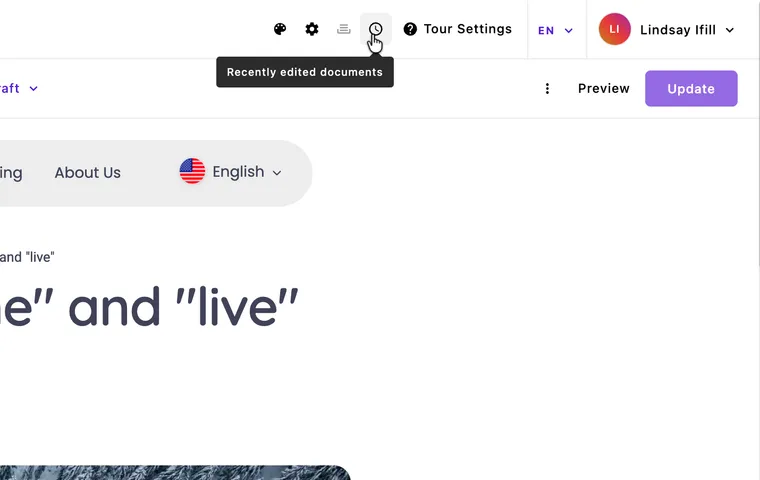
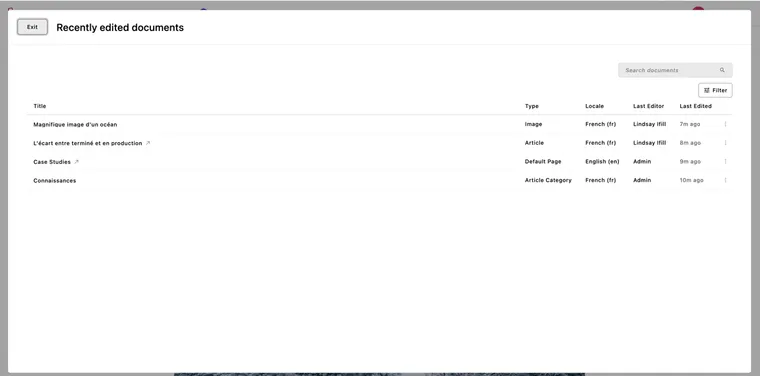
Recently Edited Documents gives editorial managers a real-time view of everything that has changed across the site, filterable by status, locale, author, action (i.e. localized), and type. It's the fastest way to see who made recent changes to what and which documents need review or are waiting on approval.

What you can filter by
| Filter | What it surfaces | Useful for |
|---|---|---|
| Live | Published documents, no pending edits | Confirming what is on the site |
| Draft | Content that has never been published | Tracking work in progress |
| Unpublished changes | Live content with edits not yet published | Finding what needs review before publishing |
| Submitted | Content awaiting editorial review | Managing the review queue |
| Archived | Removed from the site but not deleted | Auditing or restoring old content |
| Unpublished translations | Content missing in one or more locales | Translation workflow management |

The review queue use case
For editorial managers running a multi-author site, filtering by Submitted gives you an instant review queue: everything that writers have flagged as ready for your attention, sorted by last edit time. You can see at a glance what is oldest in the queue, open a document, review it, and publish or return it without needing a separate task management tool for basic content review.
Scheduled publishing
ApostropheCMS supports scheduled publishing, letting you set a future date and time for a document to go live automatically. This is useful for coordinating campaign launches, news announcements, or content that needs to publish across time zones.
How to schedule a document
First, open the editor modal. There are a few ways to do this:
From the manager modal (which shows all documents of a type), click the action menu to the right of your target document and select "Edit" or just click the title.
If you're logged in and on the document page itself, click "Edit" at the top right and then select "Edit" again from the action menu for that document. As a reminder, the action menu has three dots.
Now you should now see Scheduling fields to the right. Here, you can set the start and end dates and times for your content. Set your target date and time, and save. The document enters the queue and will publish automatically at the specified time.
Undoing changes safely in ApostropheCMS
Quick 'Undo' for immediate action
Before saving a document in ApostropheCMS, you can undo changes in two ways: use the standard keyboard shortcut, or click the "Undo" (and "Redo") buttons in the top left corner while in Edit mode.
What version history captures
Document Versions is currently in Apostrophe's paid tiers (Pro or Assembly), and work to enhance version control is scheduled for release in Fall 2026. If you have Pro or Assembly and this module is installed, you can compare two versions of documents to identify what changed, by whom, and when. Each time a document is saved, ApostropheCMS records a version snapshot. You can browse the version history from the document editor, compare what changed between versions, and restore any earlier version as the current draft. Restoring a version does not immediately publish it; the restored version becomes a draft, allowing you to review it before it goes live.
When rollback matters most
The most common rollback scenarios in editorial teams are:
Reverting content that was published prematurely
Recovering sections that were accidentally deleted during a large edit
Restoring a document to the state it was in before a bulk field update caused unintended changes.
In all three cases, ApostropheCMS's version history gives you a named restore point rather than requiring you to reconstruct the original from memory.
What rollback does not cover
Version history captures field-level content: text, images, relationships, and widget configuration. It does not capture changes to the site's template code or structural schema. If a layout problem is caused by a template change rather than a content edit, rollback will not resolve it — that requires a code-level fix.
Field-level diff view
Where version comparison is available, ApostropheCMS shows differences at the field level.
Common questions
Saving a draft keeps the document in your personal working state — it is not yet flagged for anyone else to act on. Submitting for review changes the document's status to Submitted, which signals to editors and managers that the content is ready for their attention. The Submitted status is what populates the review queue in Recently Edited Documents.
Yes. Version history captures previous states of the document. You can browse versions, review what changed, and restore any earlier version as a draft. The restored version does not go live immediately — you review it first, then publish.
Use the Recently Edited Documents manager and filter by "Unpublished changes" (currently labeled "Pending Updates" in the filter). This surfaces every live document that has edits not yet published — so you can see exactly what is queued for review before it goes live.
Yes. Publishing is locale-specific. Each language version of a document has its own publication state. Publishing the English version has no effect on the French version — they are managed independently. You can track which locales have unpublished or missing content using the Unpublished Translations filter.
Scheduling and review are independent of each other. A document can be submitted for review and scheduled at the same time. The reviewer can approve and adjust the schedule before the publish time is reached. If a scheduled document is not reviewed and corrected before its scheduled time, it will publish as-is — so for time-sensitive content, make sure the review happens before the publish window, not after.