
box
The box field is a unique field that provides a tailored UX for defining values associated with the CSS box-model, such as margin, padding, and border-width.
Module field definition
javascript
padding: {
  label: 'Container padding',
  type: 'box',
  min: -3,
  max: 50,
  step: 2,
  def: {
    top: 20,
    right: -2,
    bottom: 0
    left: 30
  }
}
Box Field UI
The UI of the box field allows you to edit all values uniformly or each individually. 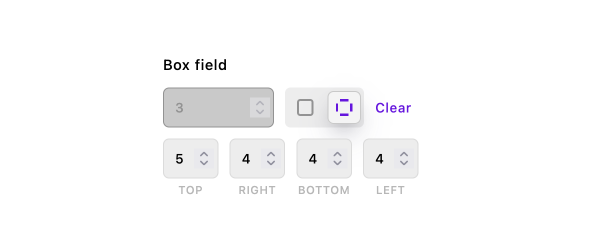
Use in templates
The value of a box field is always an object with top, right, bottom, left properties. All property values are stored as numbers, any omitted values are made null. You can pull out each value in your template like
jsx
<button
  style={piece.margin.left
    ? { marginLeft: `${piece.margin.left}px` }
    : undefined}
>
  I might have a left margin
</button>
toCss helper function
There is also a helper function that will return a string of CSS rules.
| Parameter | Type | Default | Description |
|---|---|---|---|
value | Object | n/a | The box field value |
property | String | n/a | The CSS property to assign values |
unit | String | 'px' | The CSS unit |
jsx
<button style={apos.boxField.toCss(piece.margin, 'margin', 'em')}>
  I might have margins
</button>
Settings
Required
| Property | Type | Default | Description |
|---|---|---|---|
label | String | n/a | Sets the visible label for the field in the UI |
Optional
| Property | Type | Default | Description |
|---|---|---|---|
help | String | n/a | Help text for the content editor |
def | Object | | The default value. Must be an object with keys top, right, bottom, left. Each value must be a number |
direction | String | ltr | Sets the text direction for the field. Use 'ltr' for left-to-right or 'rtl' for right-to-left. Overrides the locale's default direction. See the RTL language support guide for details. |
htmlHelp | String | n/a | Help text with support for HTML markup |
if | Object | {} | Conditions to meet before the field is active. See the guide for details. |
requiredIf | Object | {} | Conditions to meet before the field is required. See the guide for details. |
hidden | Boolean | false | If true, the field is hidden |
max | Number | n/a | The maximum allowable value for any box property |
min | Number | n/a | The minimum allowable value for any box property |
step | Number | n/a | The default increment when using the input's arrow buttons or keyboard |
required | Boolean | false | If true, the field is mandatory |
readOnly | Boolean | false | If true, prevents the user from editing the field value |