
Working with templates
Templates are where code and content turn into web pages people can actually see and use.
Apostrophe supports two template languages, and a single project can use both at once:
- JSX templates — the recommended choice for new work. A template is a JavaScript module exporting a function that returns markup. It runs entirely on the server; no client-side JavaScript is involved and there is no React runtime.
- Nunjucks templates — HTML with tags and variables sprinkled through it. Fully supported, and what existing projects and the starter kits use today.
A .jsx template can extend or include a .html one, so you can move a project across a file at a time. The reverse does not work — a Nunjucks template cannot extend a JSX one — which is why migrations run from the leaves up. See migration order.
Where templates live
Template files go in views directories, either as module subdirectories or at the project root.
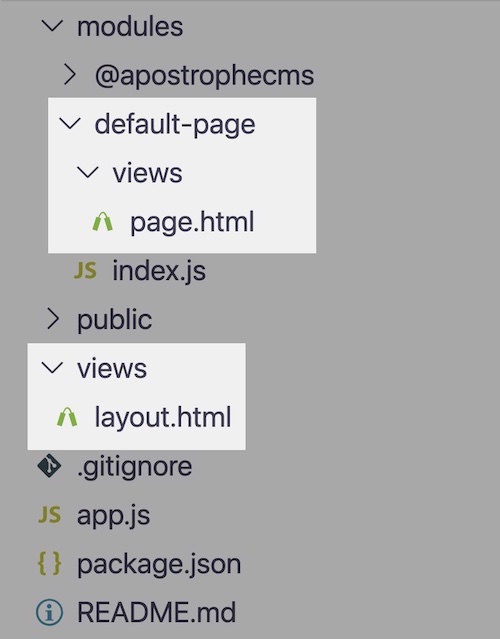
The root views directory will usually contain a layout template and often fragment templates. Templates in modules' views directories will usually be used only for their respective modules. Widget, page, and piece page templates are the main examples of that.
When you name a template without an extension, Apostrophe walks the module's view-folder override chain, preferring .jsx then .njk then .html within each folder — so a template in a nearer override folder wins regardless of its extension. See render().
How templates work together
To paraphrase John Donne, no template is an island. Templates are always used as a system, composed three ways:
| What it does | JSX | Nunjucks | |
|---|---|---|---|
| Extending | A template inherits another and replaces named blocks of it | <Extend> | {% extends %} |
| Including | One template is pulled into another | <Template> | {% include %} |
| Cross-module references | Naming a template that belongs to a different module, as module-name:file | <Template name="…"> | {% extends "module:file.html" %} |
The composition model is the same in both languages. What differs is the syntax: a Nunjucks template declares {% block %} regions that a child overrides by name, while a JSX template passes those same named regions as props, so a block's content is an expression rather than a tag pair.
Almost every page template extends a layout, which in turn extends Apostrophe's core outer layout. See the layout template guide for how that chain fits together.
Templates decide what is editable on the page
A template does more than display content. Where it renders an area, editors can add and rearrange widgets on the page; where it renders a string or richText field with <Field>, {% field %} or <AposField>, editors can type straight into it instead of opening the editor modal. See inline editing.
Further reading
- JSX templates — syntax, the Nunjucks-to-JSX cheat sheet, and what does not carry over from React
- Nunjucks templates — syntax, tags, filters, macros, and
super() - Template data — what is available inside a template
- Areas and widgets — rendering editable content
- Inline editing — putting individual schema fields on the page, editable in place